A depiction of what an NRAM chip would look like.
Credit:
Nantero
NRAM has an almost infinite number of write cycles, and is thousands of times faster than flash
A new type of non-volatile memory known as Nano-RAM (NRAM) -- it's based
on carbon nanotube and sports DRAM speed -- is now being produced in
seven fabrication plants in various parts of the world.
According to Nantero, the company that invented NRAM, it also has more
than a dozen corporate customers lined up to begin experimenting with
the memory once it begins rolling off production lines.
"So those fabs have been and are indeed producing large numbers of
wafers and chips," said Greg Schmergel, CEO of Nantero. "They are sample
chips/test chips in preparation for mass production, which requires the
product designs to be completed."
Schmergel said it will likely take a couple more years before NRAM drives begin rolling off production lines.
Nantero
The geometric construct of a carbon nanotube.
"This is one of very few technologies that's moved beyond the research
lab into high-volume manufacturing CMOS facilities," Greg Wong,
principal analyst at Forward Insights, said in a statement. "NRAM's
unique combination of high speed and high endurance has the potential to
enable innovative products in a host of consumer and enterprise
applications."
NRAM has the potential to create memory that is vastly more dense that
NAND flash, which is used to make thumb drives and solid-state drives
today. The densest NAND flash process today is near 15 nanometers. NRAM
can reach densities of below 5 nanometers, according to Schmergel.
NRAM is up against an abundant field of new memory technologies that are
expected to challenge NAND flash in speed, endurance and capacity,
according to Jim Handy, principal analyst with semiconductor research
firm Objective Analysis.
For example, Ferroelectric RAM (FRAM) has shipped in high volume, IBM has developed Racetrack Memory, Intel, IBM and Numonyx have all produced Phase-Change Memory (PCM), Magnetoresistive Random-Access Memory (MRAM) has been under development since the 1990s, Hewlett-Packard and Hynix have been developing ReRAM also called Memristor, and Infineon Technologies has been developing Conductive-Bridging RAM (CBRAM).
"It’s really very difficult to project which horse will win the race to
become the replacement for NAND flash and DRAM in 2023 or so when we
anticipate that change, this juncture is so far off," Handy said.
Over the past two years, Nantero has been able to reduce NRAM production
costs 10-fold, making it compatible with complementary
metal-oxide-semiconductor (CMOS), the standard used for making
microprocessors and DRAM.
One big advantage NRAM has over traditional NAND flash is its resistance
to heat. It can withstand up to 300 degrees Celsius. Nantero claims its
memory can last thousands of years at 85 degrees Celcius and has been
tested at 300 degrees Celsius for 10 years. Not one bit of data was
lost.
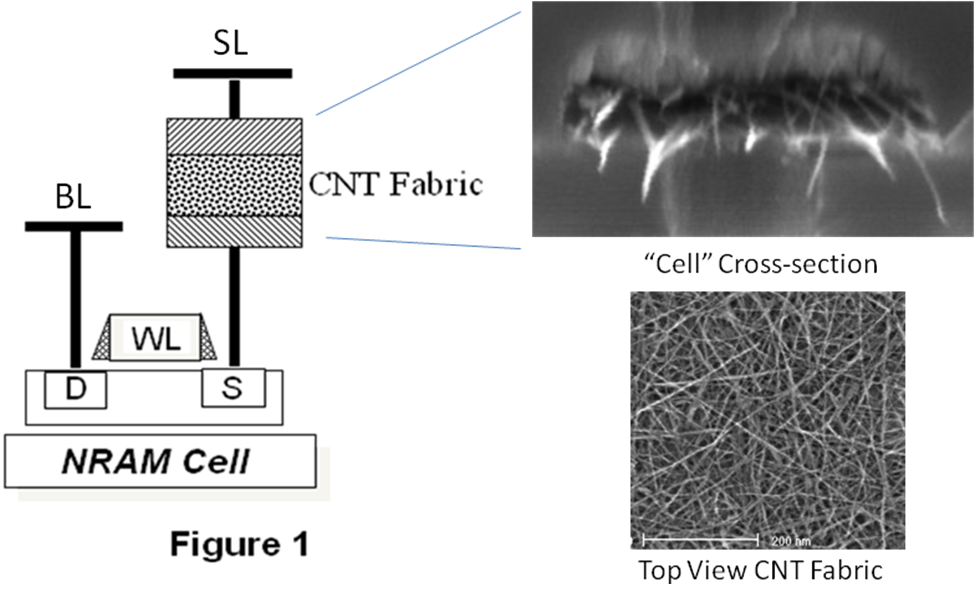
Nantero
An illustration of the NRAM cell (left) and photos taken of the carbon nanotube fabric with an electronmicroscop (right).
Anpther advantage is that NRAM is being built using the DDR4
specification interface, so it could sport up to 3.2 billion data
transfers per second or 2,400 Mbps -- more than twice as fast as NAND
flash. Natively, however, the NRAM's read/write capability is thousands
of times faster than NAND flash, Schmergel said; the bottleneck is the
computer BUS interface.
"Nanotube switch [states] in picoseconds -- going off to on and on to
off," Schmergal said. A picosecond is one trillionth of a second.
Nantero
Carbon nanotubes are strong -- very strong. In fact, they're 50 times
stronger than steel, and they're only 1/50,000th the size a human hair.
Because of carbon nanotubes' strength, NRAM has far greater write
endurance compared to NAND flash.
The best NAND flash, with error correction code, can withstand about
100,000 erase-write cycles. According to Nantero, NRAM can withstand 1012 write cycles and 1015 read cycles -- an almost infinite number.
"Heat and vibration also will not cause errors," Schmergel said.
How NRAM works
Carbon nanotubes are grown from catalyst particles -- most commonly iron.
NRAM is made up of an interlocking fabric matrix of carbon nanotubes
that can either be touching or slightly separated. Each NRAM "cell" or
transistor is made up the network of the carbon nanotubes that exist
between two metal electrodes. The memory acts the same way as other
resistive non-volatile RAM technologies.
Carbon nanotubes that are not in contact with each other are in the high
resistance state that represents the "off" or "0" state. When the
carbon nanotube contact each other, they take on the low-resistance
state of "on" or "1."
Nantero
An illustration showing the two states of NRAM, where one carbon
nanotube is either touching another, creaing a low reisistance or "on"
state; the other, where the tubes are not touching, creating a high
resistance or "off" state.
Over the past few months, Nantero has hired more than a dozen chip
design engineers who are working to create high density circuits,
including three dimensional or stacked designs for increased capacity.
"If you're taking a gum stick, then your talking about many gigabytes of capacity -- terabytes in the future," Schmergel said.
Nantero doesn't plan on producing its own NRAM drives, which will
initially be marketed for purposes similar to solid-state drive (SSD)
gum sticks or internal memory boards. But it will license its
intellectual property to companies to develop their own product.
Nantero's engineers are still in the process of creating chip designs
for the memory wafers.
Because of its resilience to heat, vibration and pressure, Nantero's
carbon nanotube memory has caught the eye of aerospace giant Lockheed
Martin and Schlumberger Ltd., the world's largest gas and oil
exploration and drilling company; both companies are customers of
Nantero.
Nantero declined to name its other customers.
"Clearly a company like [Schlumberger] would have need of memory that
could perform in environments with very high heat down in an oil well,"
Schmerge said.
Founded in 2001, Nantero has to date generated $78.1 million in five
rounds of funding, including a series E round for $31.5 million that it
just closed. The company also announced that the former vice president
of Intel's Flash Memory Group, Stefan Lai, has joined the company as a
technical advisor. Lai co-invented the EPROM (erasable programmable read
only memory) flash memory cell and led the Intel's phase change memory
(PCM) development team.
"Nantero's NRAM has unique attributes that make it the most promising
candidate to be the almost ideal memory: the nonvolatility of Flash, and
the speed and functionality of DRAM with lower cost," Lai said.
Nantaro also announced that Yaw Wen Hu, a former executive vice
president at Inotera Memories, has also come on board as a technical
advisor. Inotera, a Taiwan-based partner of Micron, supplies nearly 10%
of the world's 300mm DRAM silicon wafers at its two fabrication
facilities.
"The availability of memory technology that is extremely fast, can
deliver terabits of storage capacity in the future and consumes very
little power, has the potential to change the future of electronics,"
said Alan, Niebel, CEO of Webfeet Research. "After researching NRAM for
over twelve years, WebFeet applauds Nantero for reducing the costs of
the CNTs in an NRAM chip by 10x in the last two years, making NRAM CMOS
compatible and finally proving NRAM viability with commercial production
capability from its licensees."
6 amazing things you didn’t know about your computer By Odubanjo Bolarinwa
It’s a ritual across the globe: somewhere between sticking the kettle on
and complaining about last night’s match, you’ll probably hit the button on
your ageing company PC and wait while it slowly thinks about turning on.
Rather than take it for granted,... more »
Apple seeing huge demand for iPhone 6 and 6 Plus models
Both carriers and Apple reported tremendous demand
for iPhone 6 preorders over the weekend with new orders expected to take
weeks to fill.
Image: MacRumors
On
Friday, Apple -- plus its carrier and retail partners -- began
accepting pre-orders for the iPhone 6 and 6 Plus. The orders were record
breaking for several companies.
Apple issued a press release,
claiming 4 million pre-orders in the first 24 hours of availability,
breaking the previously announced record of 2 million pre-orders for the
iPhone 5 two years ago.
AT&T said it was that company's
biggest pre-order ever, without releasing specifics. By all accounts,
the iPhone 6 will be very, very popular.
If you didn't get your
iPhone 6 pre-order in on Friday, bad news: you could be waiting a while.
Apple's own online store is quoting 3-4 week ship times for all iPhone 6
and 6 Plus models across most countries. Verizon and AT&T are
quoting similarly delayed shipping times, with the iPhone 6 Plus pushed
to mid-November in some cases. SEE: CNET's review of the iPhone 6 Plus
UBS
analyst Steven Milunovich believes Apple could sell as many as 100
million iPhones in the second half of calendar 2014, reflecting 18% unit
growth over last year's 85 million iPhones sold.
For consumers
looking to pick up an iPhone 6 sooner, their best bet is to head to an
Apple Retail or carrier store on Friday morning. It's likely that Apple
Retail Stores will see long lines, perhaps running overnight at larger
locations, and it's unknown what stock levels will be like -- however,
Apple is almost certain to sell out of initial iPhone 6 stocks at some
point on Friday.
Other stores, like Best Buy and Walmart, may have stocks as well, with Walmart looking to push sales thanks to modest $20 discounts on purchases.
Apple,
for its part, is shipping millions of iPhones from its partner assembly
facilities in China to the United States and the other 8 launch
countries of Australia, Canada, France, Germany, Hong Kong, Japan,
Singapore and the United Kingdom.
Images shared by a MacRumors reader
who is also a pilot for a cargo shipping company show 195,000 iPhones
packed onto pallets. He claims the phones were flown from China to
Anchorage, Alaska, and then on to Chicago's O'Hare airport, consistent
with shipments from prior iPhone launches.
This
tutorial will walk you through the difficult process of installing Kali
Linux in VMware Player, a free virtual machine manager that can be
downloaded from www.vmware.com. This
tutorial assumes that you have some basic knowledge of your computer
(amount of RAM number of processors, etc.) This tutorial is also
intended for beginners who haven’t worked with VMware or Kali Linux
before.
Step One:
First we need to download Kali from http://kali.org/downloads/.
If you have a 64-bit capable computer (like me), then you probably will
want the 64-bit version of Kali for performance reasons. Expand the drop down menu’s to find the version you need. Select the 64-bit version ONLY if you have a 64-bit computer. Step Two: If
you don’t have a torrent program, then click the link highlighted above
and select “Save” when the download notification appears. Make sure you
know where you saved it.
If you have a torrent program, then I highly recommend using the torrent option. Click on the Torrent link,it will open the torrent file in your browser. Just copy the URL of it and enter it in your torrent program.
Now wait for Kali to download, this might take several hours, depending on your internet speed. Step Three: When Kali has finished downloading, open VMware Player and click Create a new virtual machine. Step Four:
In the window that opens, select Installer disc image file (iso) and browse to the location of and select the Kali Linux ISO file that you just downloaded. Once you have selected the file, click Next. Step Five:
In the next step, select a name for the virtual machine. I’m going to name it Tutorial Kali
for this tutorial. You also need to select a location for it, I
recommend creating a folder called “Virtual machines” in My Documents.
Then click Next. Step Six:
Next
step, you need to select a maximum size for Kali. I recommend doing at
least 30 GB’s as Kali tends to expand over time. After you’ve entered
your desired value (no less than 20 GB) change the next option to Store virtual disk as a single file and click Next. Step Seven:
In the next window, we need to customize some hardware settings, so click on the Customize Hardware… button. Step Eight:
You will now be presented with a Hardware window. In the left pane select Memory
in the left pane of the window, and slide the slider on the right side
to at least 512 MB*. This is for performance. Since I have 8 GB of RAM
on my computer, I’m going to put it at 2 GB’s (2000 Mb’s).*Note,
you should give a virtual machine a maximum of half the RAM installed
on your computer. If your computer has 4 GB of RAM, then the max you
want to slide it to is 2 GB. If your computer has 8 GB, then you can go
to a max of 4 GB etc..
Now highlight Processors in
the left pane. This option really depends on your computer, if you have
multiple processors, then you can select two or more. If you have a
regular computer, with two or less, then I suggest leaving this number
at one.
Moving on, click on Network Adapter in the left pane. On the right side, move the dot to the Bridged (top) option. Now click on the Configure Adapters button.
In the small window that pops up, uncheck all the boxes except for the one next to your regular network adapter and hit OK.
You can now click on Close at the bottom of the Hardware windowand then click on Finish in the Wizard. Step Nine:
After you click Finish
the window will close and the new virtual machine file will be added to
the VM library. Now all we have to do is start Kali and install it! To
do this, highlight the name of the newly created virtual machine by
clicking on it, and click Play virtual machine in the right pane.
This will start Kali for the first time. Step 10:
At the boot menu, use the arrow keys to scroll down to Graphical install and hit enter. Step 11:
The next screen will ask you to select your preferred language, you can use the mouse to select this, then click Continue. Step 12:
On the next screen, select your location and hit Continue.
It’ll now ask you for your standard keymap. If you use the standard American English keyboard, then just click Continue. Step 14:
Wait until Kali finishes detecting the hardware on your computer. During this, you might be presented with this screen:
Just hit Continue and select Do not configure the network at this time on the next screen. Step 15:
You
will now be asked to supply a hostname, which is kind of like a
computer name. You can enter anything you want, or you can just leave it
as kali. When you’re done, hit Continue. Step 16:
Kali will now ask you to enter a password for the root (main) account. Make sure you can easily remember this password, if you forget it, you’ll have to reinstall Kali. Hit Continue after you’ve enter and re-entered the password of your choice. Step 17:
The next step will ask you for your time zone, select it and click Continue. Step 18:
Wait until Kali detects the disk partitions. When you are presented with the next step, select Guided – use entire disk. (this is usually the top option) then click Continue.
The installer will now confirm that you want to use this partition. Hit Continue.
One more question about the partition will appear. Select the option that says All files in one partition and hit Continue. Step 19:
Confirm that you want to make these changes by selecting Finish partitioning and write changes to disk. Then hit Continue. Step 20:
The last question! Confirm that you really want to make these changes by moving the dot to Yes and hitting Continue for the last time.
Kali will now start installing! Wait until it has completed, this might take upwards of 30 minutes. Step 21:
Alright,
Kali has finished installing and now you are presented with a window
that asks you about a network mirror. You can just select No and hit Continue. Step 22:
After a few minutes, the installer will ask you if you want to install GRUB boot loader. Click Yes and Continue. Step 23:
The installation should now complete, and you’ll be shown with the following notification message:
Click Continue. Step 24:
After it restarts, login to it with the user name root and the password that you created earlier.
You’ve successfully installed Kali Linux in VMware.
The prevention of Ebola HF presents many challenges. Because
it is still unknown how exactly people are infected with Ebola HF,
there are few established primary prevention measures.
When cases of the disease do appear, there is increased risk
of transmission within health care settings. Therefore, health care
workers must be able to recognize a case of Ebola HF and be ready to
employ practical viral hemorrhagic fever isolation precautions or
barrier nursing techniques. They should also have the capability to
request diagnostic tests or prepare samples for shipping and testing
elsewhere.
MSF (Médecins Sans Frontières) health staff in protective clothing constructing perimeter for isolation ward.
Barrier nursing techniques include:
wearing of protective clothing (such as masks, gloves, gowns, and goggles)
the use of infection-control measures (such as complete equipment sterilization and routine use of disinfectant)
isolation of Ebola HF patients from contact with unprotected persons.
The aim of all of these techniques is to
avoid contact with the blood or secretions of an infected patient. If a
patient with Ebola HF dies, it is equally important that direct
contact with the body of the deceased patient be prevented.
CDC, in conjunction with the World Health
Organization, has developed a set of guidelines to help prevent and
control the spread of Ebola HF. Entitled Infection Control for Viral Hemorrhagic Fevers In the African Health Care Setting, the manual describes how to:
recognize cases of viral hemorrhagic fever (such as Ebola HF)
prevent further transmission in health care setting by using locally available materials and minimal financial resources.

 Nantero
  Nantero
  Nantero
 Nantero
  Nantero
  Nantero


